Key Takeaways
- On-page SEO checklist means optimizing individual page elements — title tags, headings, keywords, internal links, images, and content structure — so both search engines and readers understand and rank your page higher.
- The single biggest 2026 ranking factor is search intent match — pages that fully answer what the searcher actually wants outrank pages that just repeat keywords.
- Aim for 5–7 internal links per 1,000 words and 2–3 external links to authoritative sources per 700 words for balanced topical authority.
- Core Web Vitals, schema markup, and E-E-A-T signals (author expertise, trust, freshness) are now standard requirements, not optional extras.
- Following all 14 steps below covers keyword placement, readability, technical performance, and structured data — the full on-page SEO checklist in one place.
Let’s be honest — most “on-page SEO checklist” posts read like a legal document. Nobody actually uses them. Below is the version you’ll actually run through, step by step, before you hit publish.
If you’re still building your foundation, start with what SEO actually is and how on-page, off-page, and technical SEO work together.
1. Start With Search Intent Research
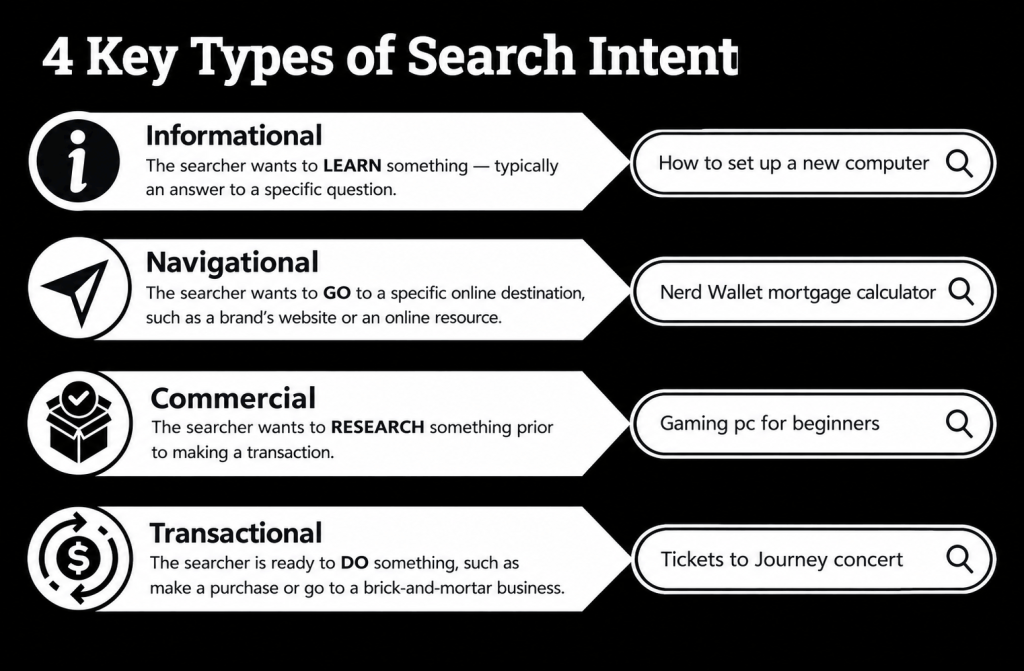
Before you write a single word, figure out why someone is typing this query. Format match beats keyword match every time in 2026.
- Google your target keyword and analyze the top 10 — note if it’s a list, guide, tool, or comparison
- Identify the dominant intent: informational, navigational, commercial, or transactional
- Check “People Also Ask” and related searches to map sub-intents
- Confirm your content format matches what’s already ranking (don’t publish a guide if listicles dominate)
Need the full framework? See our search intent and keyword research guide.
2. Do Proper Keyword Research
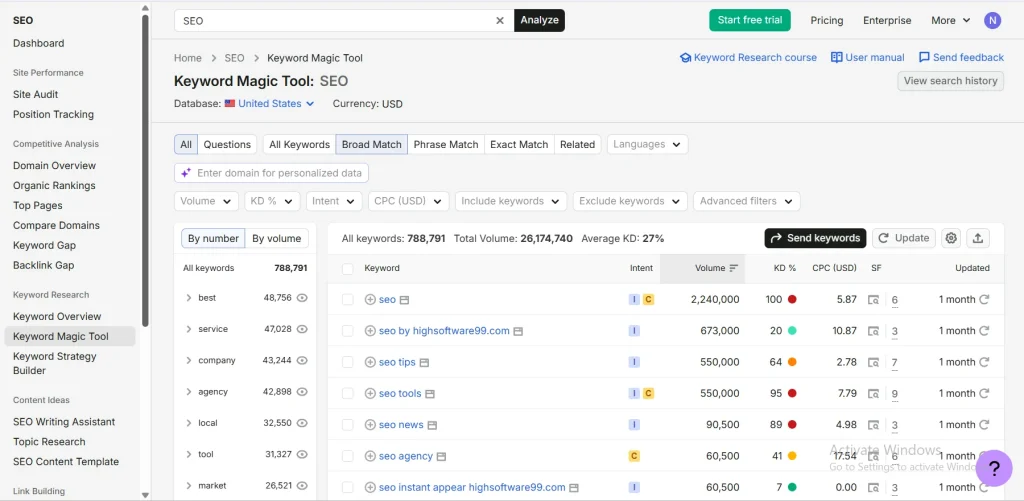
Once intent is locked, map your keyword universe — primary, secondary, and semantic.
- Set one primary keyword (e.g., “on page seo checklist”)
- Add 2–4 secondary keywords (“on-page seo tips,” “how to optimize a blog post for seo”)
- Pull related/semantic terms from Search Console, Ahrefs, or SEMrush
- Note search volume + difficulty to prioritize which terms to target in headings
3. Write an SEO-Friendly Title Tag
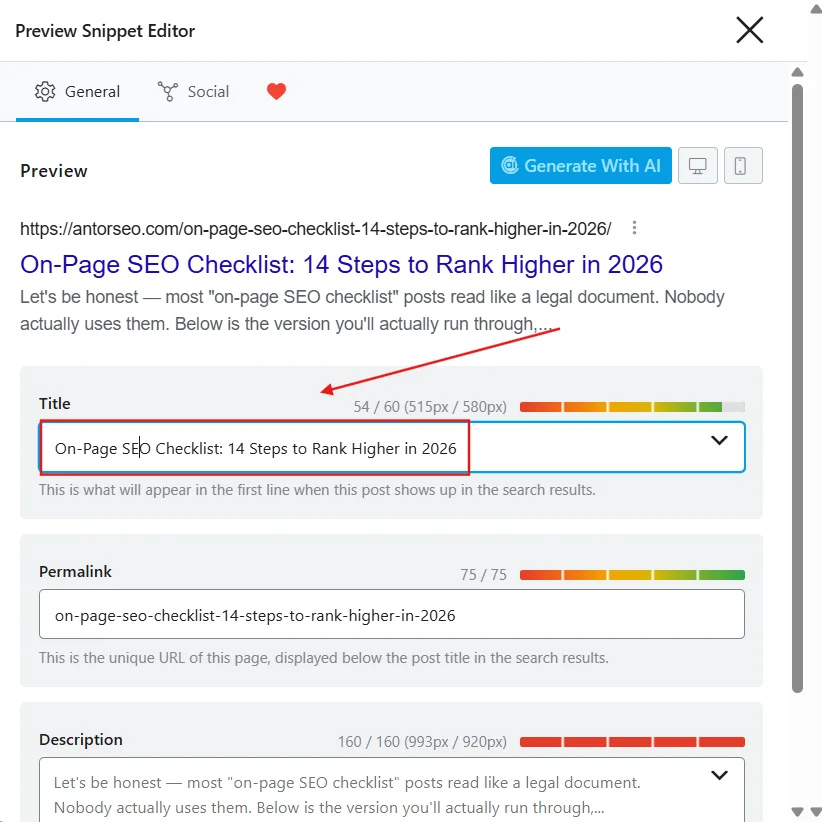
Your title tag is the first ranking signal and the first thing a human sees. It has to do both jobs.
- Keep title under 60 characters
- Place the primary keyword near the front
- Add a number, year, or power word to boost CTR (“14 Steps,” “2026”)
- Avoid clickbait Google is likely to rewrite in SERPs, see Google’s title link documentation
4. Craft a Click-Worthy Meta Description
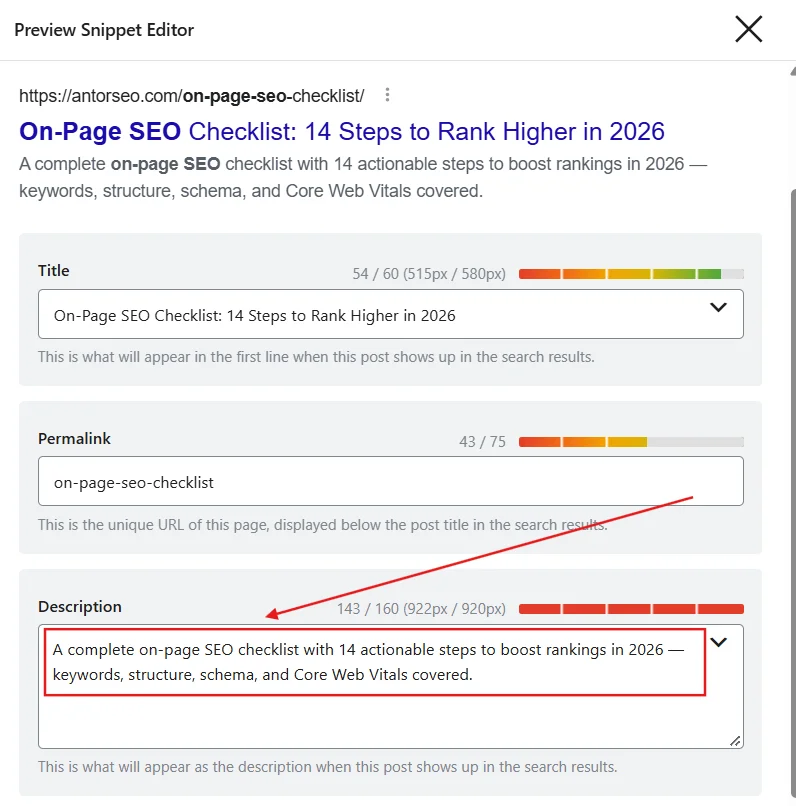
Meta descriptions aren’t a ranking factor, but they’re a CTR factor — and CTR compounds rankings over time.
- Write 150–160 characters
- Include the primary keyword naturally, once
- State a clear benefit or outcome (“rank higher,” “step-by-step”)
- End with a soft action cue (e.g., “See the full checklist”)
5. Optimize Your URL Structure
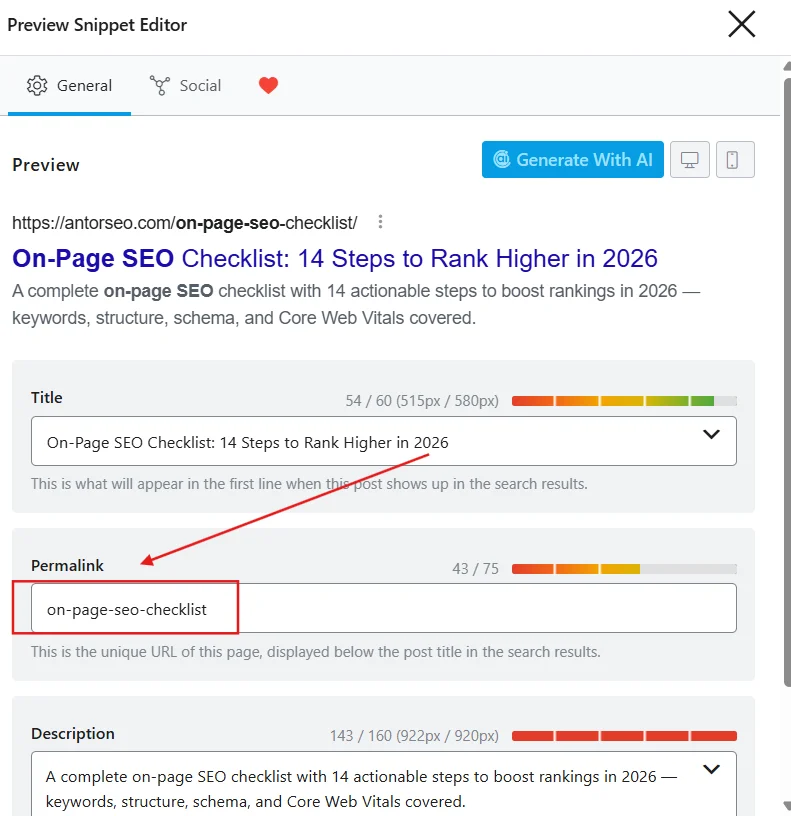
Short and descriptive beats long and automated — for both crawlers and humans sharing the link.
- Keep URL short: /on-page-seo-checklist/
- Remove stop words, dates, and category clutter
- Include the primary keyword once
- Use hyphens, never underscores
6. Use Your Primary Keyword Early
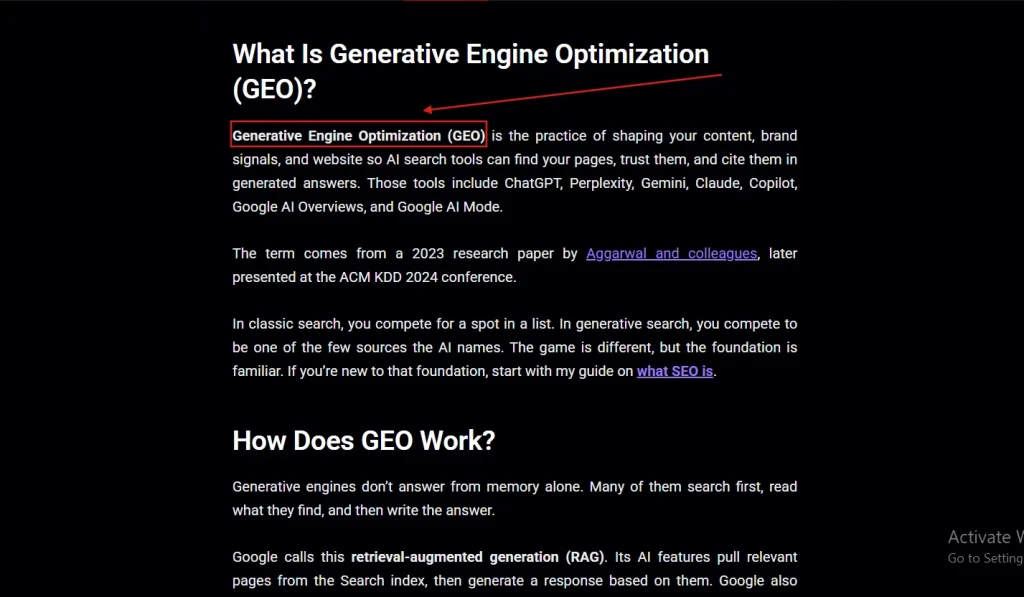
Reinforce topical relevance immediately — for the reader and for the crawler skimming your opening.
- Mention the primary keyword within the first 100–150 words
- Frame it inside a natural sentence, not a forced restatement of the title
- Avoid keyword stacking in the opening paragraph
7. Structure Content With Proper Heading Tags
Clean hierarchy helps Google parse your page — and helps you get pulled into AI Overviews and snippets.
- Use exactly one H1 (your title)
- Break sections into H2s, sub-points into H3s
- Make headings descriptive, not vague (“Optimize Your URL Structure,” not “Step 5”)
- Keep heading logic sequential — no skipping H2 straight to H4
Optimizing for AI-driven search specifically? See optimizing for Google AI Overviews.
8. Write for Readability and Skimmability
If it looks like a wall of text, it gets skipped — regardless of how good the advice is.
- Keep paragraphs to 2–3 sentences max
- Use bullet points for any list of 3+ items
- Bold key phrases readers would scan for
- Run a readability check (Hemingway or similar) before publishing
9. Optimize Images for Search
Every image is a missed (or captured) opportunity for speed and relevance.
- Compress images before upload (WebP where possible)
- Rename files descriptively (on-page-seo-checklist.webp, not IMG_2031.jpg)
- Write specific, keyword-relevant alt text — no stuffing
- Lazy-load below-the-fold images
Full technical picture here: Core Web Vitals guide.
10. Add Strategic Internal Links
Internal links tell Google what your site is about, not just what one page is about.
- Link to 5–7 relevant pages per 1,000 words
- Use descriptive anchor text — never “click here”
- Link to your on-page SEO guide and technical SEO checklist where relevant
- Prioritize links to pages that need authority the most
11. Add Authoritative External Links
Linking out to credible sources signals you’ve done your homework — and Google notices.
- Add 2–3 external links per 700 words
- Link only to established, non-spammy sources (Google docs, recognized industry sites)
- Use external links to support claims, not pad word count
- Open external links in a new tab
12. Improve Page Experience and Core Web Vitals
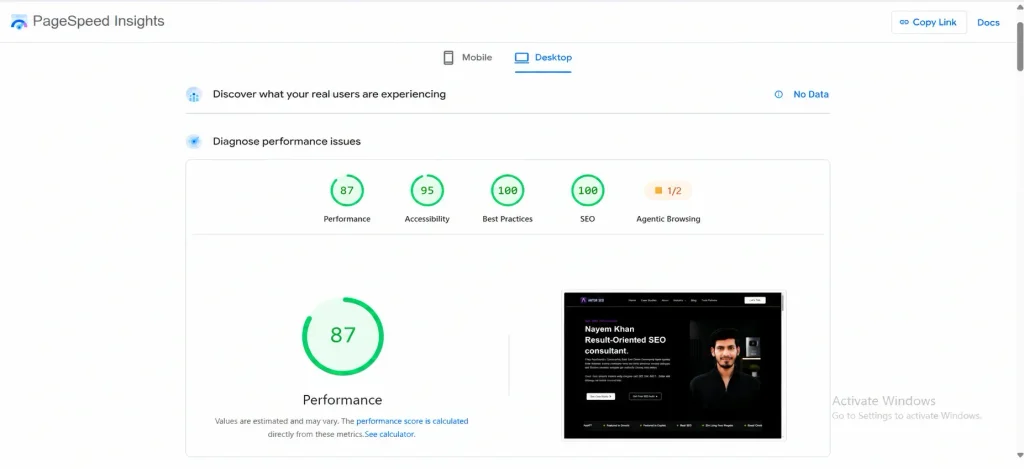
A fast, stable page keeps users around long enough to convert — and Google measures exactly that.
- Confirm LCP under 2.5s
- Confirm INP under 200ms
- Confirm CLS under 0.1
- Test on mobile first, not desktop
Pair this with our technical SEO guide for the crawlability side.
13. Implement Structured Data for AI Search Visibility
Here’s the update most checklists still get wrong: Google deprecated the public rich-result display for How-To and FAQ schema in SERPs. Adding FAQ or How-To markup will no longer earn you an accordion or step carousel directly in Google’s results.
That doesn’t make structured data useless — it makes it more important for a different reason. In 2026, schema is how you feed entity clarity and contextual accuracy into AI-driven answer engines like Google AI Overviews, ChatGPT search, and Perplexity, which parse structured data to understand exactly what your page is, who wrote it, and how confident they can be citing it.
- Add Article schema with author, publisher, and datePublished fields
- Add FAQPage schema for AI-answer-engine parsing (not for the SERP accordion)
- Ensure schema fields match visible on-page content exactly — mismatches hurt trust
- Validate with Google’s Rich Results Test before publishing
See our schema markup guide for full setup.
14. Optimize for E-E-A-T and Refresh Content Regularly
Google evaluates Experience, Expertise, Authoritativeness, and Trustworthiness as part of quality assessment — and a “2026” post has a built-in expiration date.
- Add a visible author bio with relevant credentials
- Cite credible sources for any statistic or claim
- Set a calendar reminder to refresh this post every 3–6 months
- Update the publish date and changelog when you revise
Round it out with a broader SEO content strategy and consistent off-page SEO work.
Frequently Asked Questions
-
What is the difference between on-page SEO and technical SEO?
On-page SEO covers what’s visible and content-related on a single page — titles, headings, keywords, internal links, and readability. Technical SEO covers the infrastructure behind the scenes — crawlability, indexing, site speed, and structured data. They overlap (schema and page speed touch both) but on-page is about content optimization, technical is about site health.
-
How long does on-page SEO take to show ranking results?
Typically 4–12 weeks for Google to fully recrawl, re-index, and reflect on-page changes in rankings, depending on your site’s crawl frequency and domain authority. Established, frequently-crawled sites can see movement in as little as 2–3 weeks; newer or low-authority sites often take longer.
-
Can on-page SEO rank a page without backlinks?
For low-to-medium competition keywords, yes — strong on-page SEO alone can rank a page, especially if it fully satisfies search intent better than existing results. For competitive, high-volume keywords, backlinks and off-page authority are usually still necessary to compete with established domains.
-
How often should you audit and update your on-page SEO?
Audit cornerstone content every 3–6 months, and any page tied to a fast-moving topic (like a “2026” checklist) at least twice a year. Smaller pages can be reviewed annually, but check rankings quarterly — a sudden drop is a signal to audit immediately, not wait for the schedule.
Final Thoughts
Here’s the uncomfortable truth: most sites don’t lose rankings because Google changed the algorithm — they lose rankings because nobody re-ran the checklist. On-page SEO isn’t a one-time task you check off; it’s a maintenance habit, and the sites that treat it that way are the ones still ranking a year from now.
Run through these 14 steps on your next post — or better yet, let us run through them for you. Get a free On-Page & Technical SEO audit from Antor SEO and see exactly where your site stacks up against this 14-step framework, with a prioritized action plan you can implement this week.