
Key Takeaways
- An XML sitemap is a file that lists the pages you want Google to find. It helps new, large or poorly linked sites get crawled.
- Google says a site with about 500 pages or fewer that is well linked internally may not need one, but a sitemap rarely hurts.
- One sitemap file can hold up to 50,000 URLs or 50MB uncompressed. Bigger sites split their URLs and use a sitemap index.
- Google ignores the priority and changefreq tags. It uses lastmod only when the dates are consistently accurate.
- Submitting a sitemap is a hint, not a guarantee. Google may still choose not to crawl or index some URLs.
An XML sitemap is one of the simplest technical SEO files, and one of the most often set up wrong. Many sites list redirected pages, noindexed pages or duplicate URLs in their sitemaps, which sends Google mixed signals about what matters.
This guide covers XML sitemap best practices from Google’s own documentation: who needs one, what to include, the tags that matter, size limits and how to submit it.
What Is an XML Sitemap?
Google’s sitemap overview describes a sitemap as a file that lists the pages, videos and other files on your site and how they relate. It tells Google which files you think are important and can include details such as when a page was last updated.
A basic XML sitemap entry looks like this:
<url><loc>https://example.com/page/</loc><lastmod>2026-11-10</lastmod></url>
Google also accepts RSS or Atom feeds and plain text files with one URL per line, but XML is the most flexible format. It is the only one that can carry image, video and news details and alternate language versions.
Do You Need an XML Sitemap?
Google’s guidance gives clear signals:
| You probably need one if | You may not need one if |
|---|---|
| Your site is large | Your site has about 500 pages or fewer you want in search |
| Your site is new with few external links | Every important page is linked from your home page and menus |
| You have many images, videos or news articles you want in search | You have few media pages you want to appear in search |
In practice, almost every business site should have one. It costs nothing, most platforms create it automatically, and it gives you a useful report in Search Console. WordPress, Wix and similar platforms often provide a sitemap already.
XML Sitemap Best Practices
1. Include Only Canonical, Indexable URLs
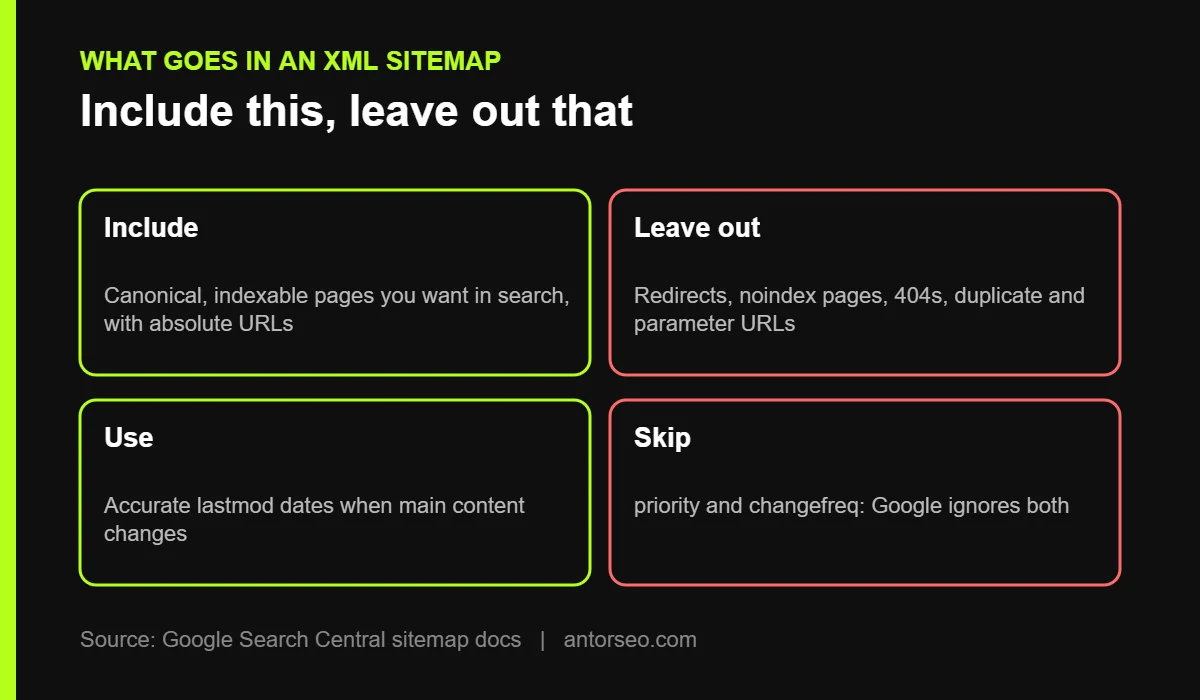
Google’s guide to building a sitemap says to use the canonical version of each page and fully qualified absolute URLs. Leave out:
- Redirected URLs (301 and 302).
- Pages with a noindex tag.
- Pages that return 404 or other errors.
- Duplicate or parameter URLs, such as sorted or filtered versions.
- Thin utility pages such as tag archives, if you have chosen to keep them out of search.
A clean sitemap is a list of pages you actually want indexed. If it contains junk, Google learns to trust it less, and you waste crawling, which we explain in our crawl budget guide.
2. Use lastmod Correctly
Google ignores the priority and changefreq tags. It uses lastmod only when the dates are consistently and verifiably accurate. Update lastmod when the main content, structured data or links change, not for small edits like a new copyright year in the footer.
3. Stay Within Size Limits
One sitemap file can contain up to 50,000 URLs or 50MB uncompressed. Larger sites should split URLs into several sitemaps and list them in a sitemap index file. Splitting by type, such as posts, pages, products and categories, also makes it easier to see indexing problems for each type in Search Console.
4. Use UTF-8 and Place It at the Root
Sitemap files must be UTF-8 encoded. Google recommends placing the sitemap at the root of your site, such as example.com/sitemap.xml. A sitemap placed in a subfolder only covers URLs in that folder unless you submit it through Search Console.
5. Add Image and Video Details When They Matter
If images or videos are important for your traffic, you can add sitemap extensions that tell Google where images are on a page or give video details such as running time. This helps with image and video search, especially for stores and media sites. See our product page SEO guide for image tips.
How to Submit Your Sitemap to Google
There are two main ways, and you can use both:
- Search Console: open the Sitemaps report, enter your sitemap URL and click Submit. Our Google Search Console guide shows where to find it.
- robots.txt: add a line such as
Sitemap: https://example.com/sitemap_index.xmlanywhere in your robots.txt file. You can list more than one sitemap.
Google is clear that submitting a sitemap is only a hint. It does not guarantee that Google will download it or crawl every URL in it.
Sitemaps in WordPress
WordPress has a basic built-in sitemap at /wp-sitemap.xml. SEO plugins replace it with a more flexible one:
- Rank Math creates /sitemap_index.xml and lets you choose which post types and taxonomies to include.
- Yoast SEO also uses /sitemap_index.xml and leaves out noindexed content automatically.
After setup, open the sitemap in your browser, check that it lists the right sections, and exclude ones you do not want indexed, such as media attachment pages or author archives on a single-author site. Our WordPress SEO page covers other plugin settings.
How to Check Sitemap Problems
In Search Console’s Sitemaps report, check:
- Status: whether Google read the file successfully.
- Discovered URLs: how many URLs Google found in it.
- Page indexing for that sitemap: click through to see which listed URLs are indexed and why others are not.
If many sitemap URLs are not indexed, look for patterns. Common causes are duplicate pages, thin content or pages blocked elsewhere. Our technical SEO checklist covers the next checks.
Common Sitemap Mistakes
- Listing redirected, noindexed or broken URLs.
- Including both http and https, or both www and non-www versions.
- Setting every lastmod to today’s date on every crawl.
- Forgetting to update the sitemap after a site migration.
- Blocking the sitemap URL in robots.txt.
- Relying on a sitemap instead of good internal linking. A sitemap helps discovery, but links show Google which pages matter most.
Frequently Asked Questions
What is an XML sitemap in SEO?
It is a file that lists the URLs you want search engines to crawl and index, with optional details such as last update dates.
Does a sitemap improve rankings?
Not directly. It helps Google find and recrawl pages, which matters for new and large sites. Rankings still depend on content quality and links.
How many URLs can a sitemap have?
Up to 50,000 URLs or 50MB uncompressed per file. Use a sitemap index for more.
Should I include noindex pages in my sitemap?
No. A sitemap should list only canonical pages you want indexed.
Does Google use priority and changefreq?
No. Google ignores both. It uses lastmod only when the dates are accurate.
Not sure if your sitemap is helping or hurting? Our free SEO audit checks your sitemap, indexing and crawl setup.