Key Takeaways
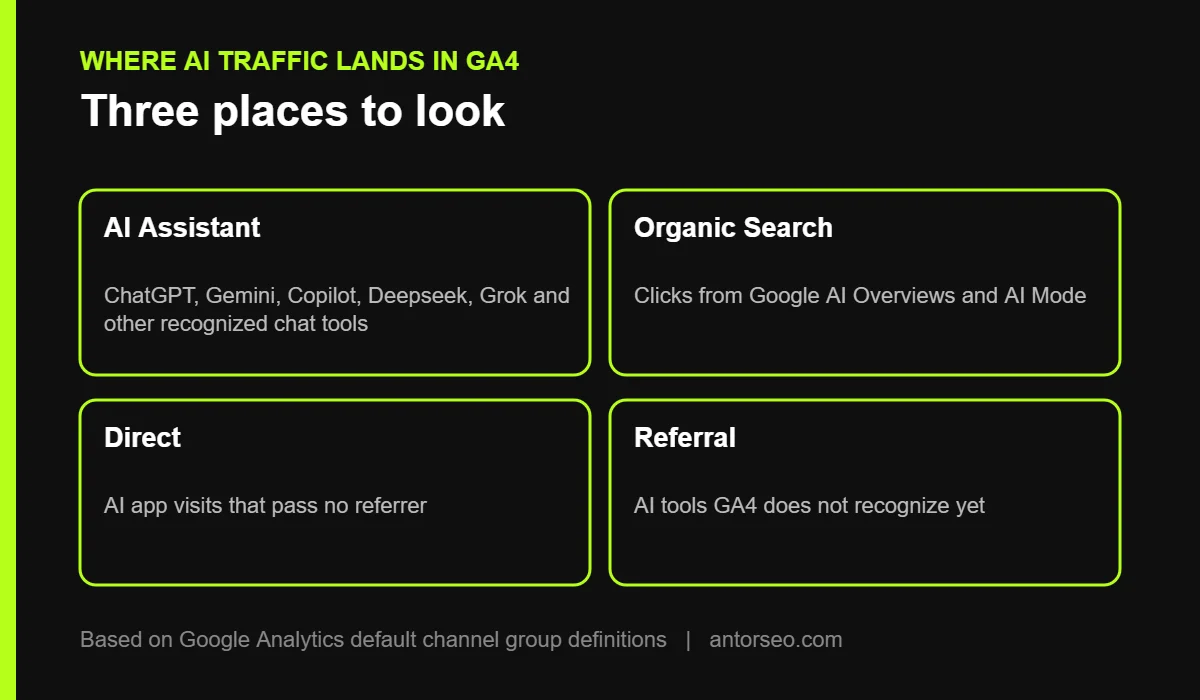
- GA4 now has a built-in AI Assistant channel. Visits from AI chat tools such as ChatGPT, Gemini, Copilot, Deepseek and Grok are grouped automatically, with no regex needed.
- Clicks from Google AI Overviews and AI Mode are not in that channel. Google counts them as Organic Search.
- Visits from AI apps that do not pass a referrer still land in Direct, so the AI Assistant number is a floor, not the full total.
- Check Session source alongside the channel to see which assistant sends the most visits, and build a custom channel group for any tool GA4 does not recognize yet.
- Track conversions, not just sessions. AI traffic is usually small, so judge it by leads and revenue.
More people now find websites through AI assistants. Someone asks ChatGPT for the best SEO consultant for a SaaS company, gets an answer with a link, and clicks. Until recently, that visit was hard to see in Google Analytics. It was mixed into Referral or Direct traffic with everything else.
In 2026, Google changed that. This guide explains how to track AI traffic in GA4: where the new AI Assistant channel shows up, what it misses, and how to build reports that show whether AI visibility brings you real leads.
The New AI Assistant Channel in GA4
Google added an AI Assistant channel to GA4’s Default Channel Group in May 2026. According to Google’s default channel group documentation, it covers users who arrive from AI chat tools such as ChatGPT, Gemini, Deepseek, Copilot or Grok.
When GA4 recognizes the referring site as an AI assistant, it does three things automatically:
- Sets the medium to ai-assistant.
- Sets the campaign to (ai-assistant).
- Groups the session in the AI Assistant channel.
Before this change, these visits usually showed as Referral, mixed with links from blogs, directories and news sites.
Where to Find AI Traffic in GA4
- Open GA4 and go to Reports, then Acquisition, then Traffic acquisition.
- Make sure the table uses Session default channel group.
- Look for the AI Assistant row. It appears once your site gets visits from recognized assistants.
- Add Session source as a secondary dimension to see which assistants send traffic, for example chatgpt.com or gemini.google.com.
- Add your key events, such as form submissions or purchases, as a metric to see which AI sources convert.
What the AI Assistant Channel Does Not Include
The new channel is useful, but it does not show all AI-driven visits. Knowing the gaps prevents bad conclusions.
| Type of AI visit | Where it shows in GA4 |
|---|---|
| Click from ChatGPT, Gemini, Copilot and other recognized chat tools on the web | AI Assistant |
| Click from Google AI Overviews or AI Mode | Organic Search (Google counts these as organic) |
| Click from an AI app that does not pass a referrer | Direct |
| Click from an AI tool GA4 does not recognize yet | Usually Referral |
Google’s own AI features are counted as organic. Google’s documentation says Organic Search includes AI Overviews and AI Mode. To see your visibility in those features, use the Generative AI performance report in Search Console, covered in our Google Search Console guide.
Missing referrers go to Direct. Some mobile and desktop apps open links without passing referrer information. GA4 cannot tell where those visits came from.
New or smaller AI tools may be missed. Google uses its own list of recognized assistants. If you see an AI tool in your Referral report, it is not on that list yet.
How to Catch AI Tools GA4 Misses
If an AI tool shows up under Referral, create a custom channel group so it is reported with the rest of your AI traffic.
- Go to Admin, then Data display, then Channel groups.
- Create a new channel group. GA4 starts it with the same channels as the default group.
- Add a new channel named AI Referral (custom) with the condition: Source matches regex, followed by the domains you found, for example perplexity.ai or claude.ai if they appear under Referral in your data.
- Move the new channel above Referral in the list, because GA4 assigns sessions to the first rule they match.
- Save, then use the new channel group in the Traffic acquisition report.
Only add domains you have actually seen in your reports, and check the list every few months as Google updates its own.
Build a Simple AI Traffic Report
Track these four numbers every month:
- AI Assistant sessions, and their share of total sessions.
- Engagement rate compared with Organic Search.
- Key events such as leads, sign-ups or sales from AI sources.
- Top landing pages for AI traffic, which show what AI tools cite from your site.
To find landing pages, open the Landing page report, add a filter for Session default channel group equals AI Assistant, and sort by sessions. These pages are what AI tools trust from your site. Keep them accurate and up to date, and link them to your service pages.
Make Sure Conversions Are Tracked
AI traffic is usually small compared with search. Its value shows in conversions. Before you judge AI visibility, make sure GA4 is recording the actions that matter:
- Contact form submissions and booking clicks as key events.
- Phone number clicks on mobile.
- Purchases with revenue for online stores.
Then compare conversion rates by channel. If AI visitors convert well, that supports investing in generative engine optimization. Our SEO ROI guide shows how to put a value on organic and AI leads.
Connect AI Traffic to AI Visibility
GA4 shows what happens after the click. It does not show how often you appear in AI answers without a click. For the full picture:
- Use Search Console for Google AI Overviews and AI Mode impressions.
- Use an AI visibility tool to see mentions and citations in ChatGPT, Perplexity and Gemini.
- Use GA4 for visits and conversions from those sources.
Together, these answer the questions clients actually ask: are we showing up, and is it bringing business? Learn how to grow that visibility in how to rank in ChatGPT and Perplexity and Google AI Mode SEO.
Frequently Asked Questions
Does GA4 track ChatGPT traffic?
Yes. Since May 2026, visits from ChatGPT on the web are grouped in the AI Assistant channel automatically when the browser passes the referrer.
Why is my AI Assistant channel empty?
Either your site gets few visits from AI tools, or those visits arrive without a referrer and show as Direct. Also check Session source under Referral for AI domains GA4 has not recognized.
Are Google AI Overviews clicks counted as AI traffic in GA4?
No. Google counts AI Overviews and AI Mode clicks as Organic Search. Use the Search Console Generative AI report to see impressions in those features.
Do I still need a custom channel group for AI traffic?
Only if AI tools you care about still appear under Referral. The default channel covers the main chat assistants, but Google controls the list.
How much traffic do AI assistants send?
It varies widely by site and industry. Check your own Traffic acquisition report, and judge AI traffic by conversions rather than session count.
Want to know how much business AI search sends you? Our free SEO audit includes a GA4 and AI traffic check.