
Key Takeaways
- llms.txt is a Markdown file at your site root that gives AI tools a short, curated map of your best pages.
- It is a community proposal, not an official standard, and it is not a ranking factor.
- Google’s John Mueller has said no AI system currently uses it, so treat it as low-cost groundwork, not a growth lever.
- The file is most useful for documentation, APIs, and product pages that AI coding tools and agents read directly.
- Crawlable HTML, clean structure, schema markup, and fast pages matter more for AI visibility than any single file.
- You can build a solid llms.txt in under an hour and maintain it with your normal content workflow.
Is Your Website Readable to a Machine That Never Sees Your Design?
When a buyer asks an AI assistant to compare three project management tools, the assistant does not admire your homepage. It reads text, follows links, and picks the pages that answer the question fastest.
Most B2B and SaaS sites are built for human eyes first. They have heavy scripts, tabbed pricing tables, pop-ups, and navigation that machines struggle to parse. A person can work around that. An AI agent with limited time and a limited context window often cannot.
That is the problem llms.txt tries to solve. It gives AI tools a clean entry point to your most useful content. Before you add one, though, you need to know what it does and what it does not do.
What Is llms.txt?
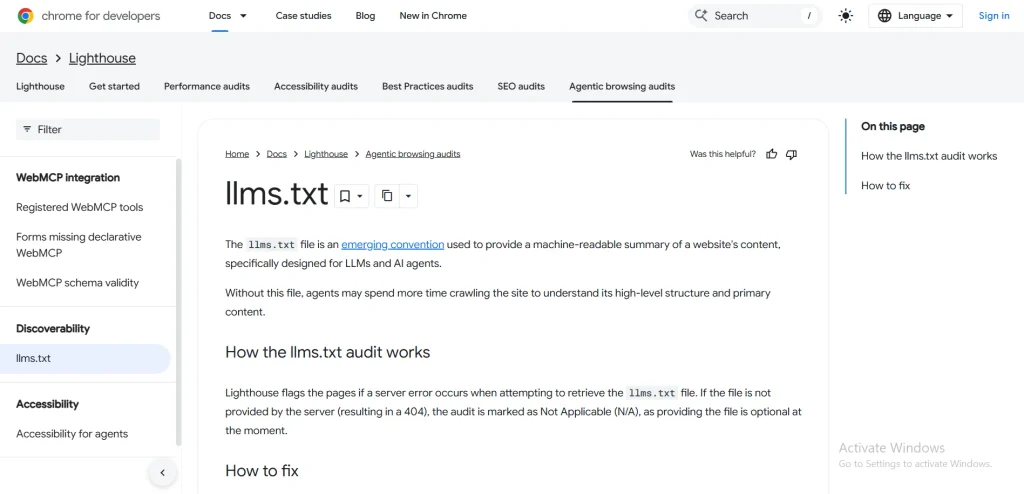
llms.txt is a plain Markdown file placed at yourdomain.com/llms.txt. The llmstxt.org proposal describes it as a curated index of the pages an AI system should read first, with short notes on what each page covers.
Think of it as a table of contents written for machines. Your sitemap lists every URL. Your llms.txt lists the few that matter most and explains why.
How llms.txt Differs From robots.txt and sitemap.xml
These three files get confused often, so here is the split:
- robots.txt tells crawlers what they may or may not access. It uses directives.
- sitemap.xml lists all indexable URLs so search engines can discover them.
- llms.txt highlights key pages in readable Markdown. It has no directives and cannot block anything.
That last point matters. If you want to control which AI bots can crawl your site, llms.txt is the wrong tool. Use robots.txt for that.
Does llms.txt Actually Work? An Honest Answer
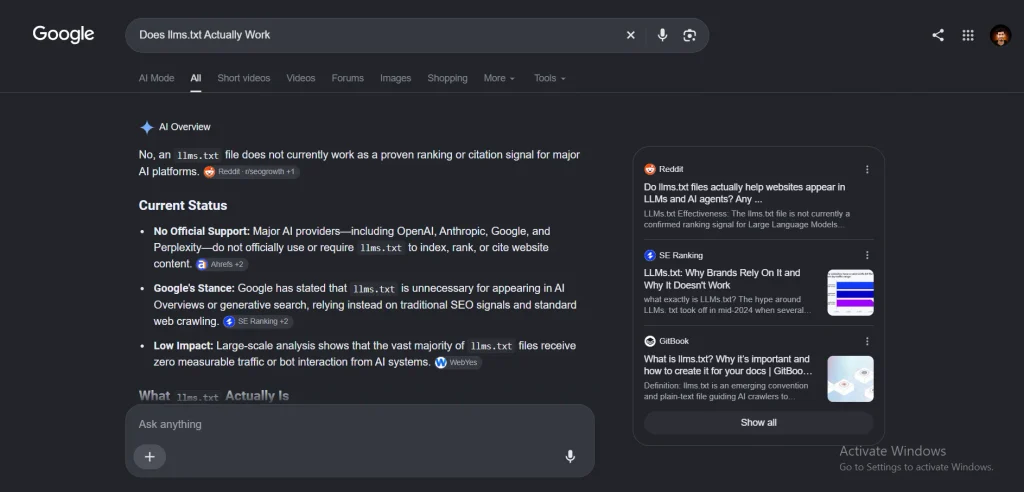
Here is where most guides oversell. The evidence so far is thin.
Google’s John Mueller said on Bluesky that no AI system currently uses the file, and that server logs show chatbots fetching regular pages but not llms.txt. Google’s Gary Illyes also stated that Google does not support it and has no plans to. Some site owners have shared log files showing other crawlers requesting the file, but no major AI company has announced formal support.
So why bother? Three reasons:
- It costs almost nothing. One Markdown file, one hour of work.
- Developer tools already use it. AI coding assistants and agents can ingest documentation that follows the format, which helps SaaS products with APIs and technical docs.
- It forces a useful audit. Deciding which 15 pages best represent your business is good strategy work, whether or not a bot ever reads the file.
The honest position: add it, keep expectations low, and put your real effort into the fundamentals covered later in this guide.
A Short Scenario: The SaaS Founder With 400 Pages
Picture a founder running a B2B analytics tool. Her site has 400 URLs: old release notes, thin tag pages, three versions of the pricing page, and a handful of strong guides.
She asks an AI assistant to summarize her product category and notices it cites a competitor’s cleaner documentation instead. Her best content exists, but nothing points to it.
She spends one afternoon choosing 20 pages: core product pages, pricing, integration docs, and her best explainers. She writes a one-line description for each and publishes them as llms.txt. She also fixes the real issues underneath, such as a pricing table that only loads through JavaScript.
The file did not fix her visibility. The audit behind it did. That is the right way to think about this whole project.
How to Create an llms.txt File Step by Step
Step 1: Choose Your Priority Pages
Pick 10 to 30 pages that explain what you do and prove it. For most B2B and SaaS sites that means:
- Your homepage and main product or service pages
- Pricing and plans
- Documentation, API references, and integration guides
- Your strongest educational content
- Case studies and about pages that support trust
If a page would confuse a first-time visitor, leave it out.
Step 2: Write Clear One-Line Descriptions
Each link gets a short note. Write them like you would explain the page to a colleague. Skip adjectives and say what the reader will find.
Step 3: Follow the Format
The proposed structure is simple:
- One H1 with your site or company name (the only required element)
- An optional blockquote with a short summary
- Optional paragraphs of context
- H2 sections containing link lists
- An optional H2 section titled “Optional” for secondary pages that can be skipped when context is limited
Step 4: Use This Template
| Acme Analytics Acme Analytics is a B2B reporting platform for finance teams. It connects to accounting tools and builds live dashboards without code. Key facts: founded in 2019, serves mid-size companies in the US and EU, SOC 2 compliant. Product Platform Overview: What Acme does and who it is for Pricing: Plans, limits, and billing terms Integrations: Supported accounting and CRM tools Documentation Getting Started: Setup in five steps API Reference: Endpoints, authentication, and rate limits Resources Finance Reporting Guide: How to build a monthly reporting workflow Case Study: Mid-Size Retailer: Results from a real deployment Optional Changelog: Release history |
Step 5: Publish at the Root and Test It
Upload the file so it loads at yourdomain.com/llms.txt. Open it in a browser, confirm the links resolve, and check that it returns a 200 status. If you run WordPress, a plugin can generate and update it, but review the output by hand before you rely on it.
Step 6: Consider llms-full.txt
Some sites also publish llms-full.txt, which contains the full text of key pages in one Markdown file. It suits documentation-heavy products. Be aware that large files can exceed what some tools can process, so keep it focused.
What Matters More Than llms.txt for AI Agents
If AI visibility is the goal, these fundamentals do more work than any single file. They also happen to be good SEO, which is the point. Strong SEO already covers most of what answer engines need, as explained in SEO vs AEO vs GEO.
Keep Your Content Crawlable and Server-Rendered
If key copy only appears after JavaScript runs, some agents will never see it. Put pricing, features, and definitions in plain HTML. Work through a technical SEO checklist to catch rendering, indexing, and crawl problems.
Add Structured Data
Schema markup labels your content so machines know what each piece is: a product, an organization, a FAQ, an article. Use the vocabulary at Schema.org and validate it before publishing.
Fix Speed and Stability
Slow pages get skipped by both users and crawlers. Review your Core Web Vitals and fix the largest problems first.
Write Answer-First Content
AI tools favor pages that answer a question in the first few lines, then expand. This is the core idea behind answer engine optimization. Lead with the direct answer, then add detail, examples, and sources.
Build Trust Signals
Named authors, original data, and real customer proof help both people and machines judge reliability. See how E-E-A-T applies here.
Link Your Content Together
Clear internal links help crawlers find your best pages and understand how topics connect. Follow an internal linking guide and make sure every priority page in your llms.txt is also well linked from the rest of your site.
Where llms.txt Fits in a Wider AI Visibility Plan
Treat llms.txt as one small piece of generative engine optimization. A practical order of work looks like this:
- Fix crawlability and rendering issues.
- Strengthen your core pages with direct answers and schema.
- Earn mentions and citations from credible sites.
- Publish llms.txt as a tidy, low-effort extra.
- Track whether AI platforms cite you, using the approach in how to rank in ChatGPT and Perplexity.
For Google specifically, the same principles apply to AI Overviews. SaaS teams can also see how these pieces combine in GEO and AEO for SaaS companies.
Common llms.txt Mistakes to Avoid
- Listing every URL. The file is a curated shortlist, not a sitemap.
- Writing vague descriptions. “Learn more about us” tells a machine nothing.
- Leaving dead links. Audit the file whenever you retire or move pages.
- Expecting rankings. It is not a ranking signal.
- Blocking it by accident. Make sure robots.txt and your firewall allow the file to load.
- Forgetting updates. Add llms.txt review to your regular content update routine.
Frequently Asked Questions
-
What is llms.txt used for?
It gives AI tools a short, readable index of your most important pages. It helps most with documentation and technical content that agents and coding assistants read directly.
-
Does llms.txt improve Google rankings?
No. Google has said it does not use the file for Search, and it is not a ranking factor. Focus on standard SEO and helpful content for Google visibility.
-
Where do I put the llms.txt file?
Place it at the root of your domain, so it loads at yourdomain.com/llms.txt. The proposal also allows subpaths for specific sections of a site.
-
Is llms.txt the same as robots.txt?
No. robots.txt controls crawler access with directives. llms.txt only points to useful content and cannot block or permit any bot.
-
Should every B2B or SaaS site have one?
It is worth adding if you publish documentation, an API, or a large library of guides. For small brochure sites, fixing crawlability and structure will pay off more.
Conclusion
An llms.txt file is a simple, cheap way to tell AI tools where your best content lives. It will not lift your rankings, and no major AI platform has confirmed it reads the file today. The real value is the clarity you gain by choosing your key pages and the technical cleanup that comes with it.
Publish the file, but spend most of your effort on crawlable pages, structured data, fast load times, answer-first writing, and trust signals. Those improve how both search engines and AI agents read your site.
If you want help auditing your site for AI readiness, get in touch and share your website. You can also explore SaaS SEO services built for B2B growth.