
Your website could be the best answer to a searcher’s question, and Google still might not know it. That’s what schema markup fixes.
Here’s the deal: search engines are smart, but they’re not mind readers. They crawl text, but they don’t always understand context. Is “Apple” the fruit or the company? Is “2026” a year, a price, or a rating?
Schema markup answers that question before Google even has to ask. It’s a small piece of code that tells search engines exactly what your content means, not just what it says.
The payoff? Rich snippets, star ratings, FAQ dropdowns, and a much better shot at showing up in AI search answers from ChatGPT, Perplexity, and Google AI Overviews.
In this guide, I’ll walk you through what schema markup is, why it matters more than ever in 2026, and exactly how to add it to your site, even if you’ve never touched code before.
Key Takeaways
- Schema markup is code (usually JSON-LD) that tells search engines and AI models exactly what your content means.
- It’s not a direct ranking factor, but it drives rich snippets, higher click-through rate, and better AI search visibility.
- The four most useful types to start with are FAQ, Article, Organization, and How-To schema.
- You can add schema through a WordPress plugin like Rank Math, manual JSON-LD code, or Google Tag Manager, no advanced dev skills required.
- Always test your schema with Google’s Rich Results Test before you publish.
What Is Schema Markup and Structured Data SEO?
Schema markup is a shared vocabulary that search engines agreed to use. Think of it as a translator that sits between your content and Google’s crawlers.
Without schema, Google reads your page and guesses. With schema, you tell it directly: “This is a recipe.” “This is a product with a $49 price tag.” “This is a review with a 4.8 star rating.”
The technical term for this is structured data. Schema markup is simply the vocabulary (from Schema.org) used to write that structured data. Google’s own structured data documentation is worth bookmarking as you work through this guide.
Here’s a simple way to think about it:
- Structured data is the concept: organized, labeled information a machine can read.
- Schema.org is the vocabulary: the agreed set of labels (like “Recipe,” “Product,” “FAQPage”).
- JSON-LD is the format: the most common way to write that vocabulary into your page’s code.
Google, Bing, Yahoo, and Yandex all created Schema.org together back in 2011. That’s why it works across nearly every search engine, and now, every major AI model too. If you’re still building out your foundational SEO, start with a solid keyword research process first, since schema only pays off once you’re targeting the right terms.
Why Schema Markup Matters for SEO and AI Search
Why does this matter? Because visibility isn’t just about ranking anymore. It’s about being understood.
1. Rich Snippets Boost Click-Through Rate
Pages with schema markup can show star ratings, prices, FAQ dropdowns, and images directly in search results. That’s real estate your competitors without schema simply don’t get.
A plain blue link competing against a listing with 5 gold stars and “1,204 reviews” underneath it? You already know which one gets the click.
2. It’s How AI Search Engines Read Your Content
This is the part most people miss in 2026. Tools like ChatGPT search, Perplexity, and Google AI Overviews don’t just skim your paragraphs. They lean heavily on structured data to pull accurate facts fast.
When an AI model is deciding which source to cite for an answer, clearly labeled data (author, publish date, FAQ answers, product specs) is easier to trust and easier to extract than a wall of unstructured text. I cover this in more depth in my guide on getting your brand cited by ChatGPT and Perplexity, and schema markup is one of the foundational pieces of that strategy.
The bottom line is this: schema markup is quickly becoming table stakes for AI visibility, not just a “nice to have” for search snippets. It ties directly into generative engine optimization, which is the broader practice of getting your content surfaced inside AI-generated answers.
3. It Reinforces E-E-A-T Signals
Schema types like Organization, Person, and Article let you explicitly label your author, your credentials, and your business details. That helps search engines connect trust signals to your content instead of guessing at them. If you haven’t already, read my full breakdown of E-E-A-T for SEO and AI search to see how schema fits into the bigger trust picture.
Essential Schema Markup Examples (JSON-LD)
Let’s get practical. Below are four schema types you’ll use the most, with clean JSON-LD code you can copy, edit, and paste directly into your site.
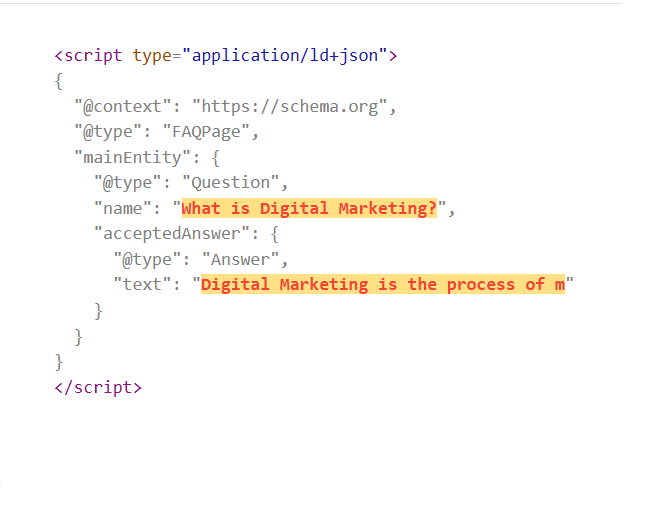
FAQ Schema Example
Use this on any page where you answer common questions. It’s one of the easiest ways to earn extra space in search results. Google’s FAQPage documentation lists the exact fields it supports.
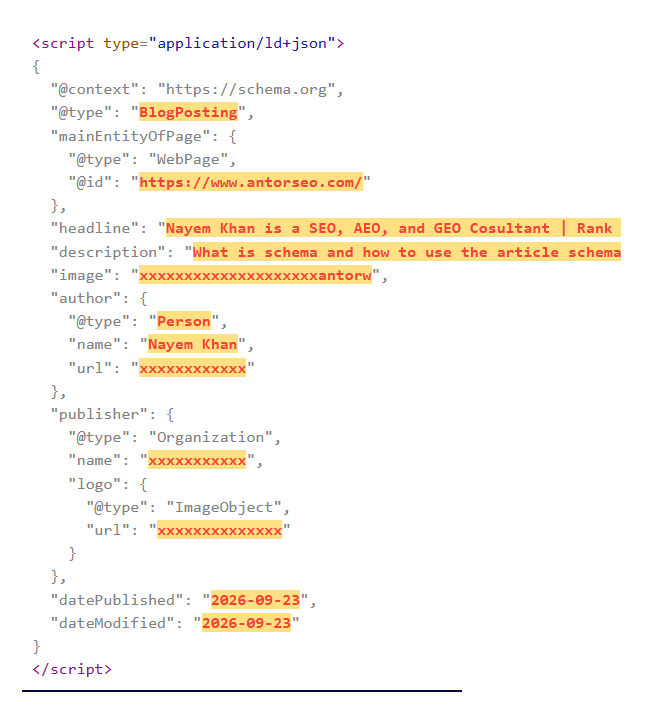
Article Schema Example
This tells search engines your page is a piece of published content, who wrote it, and when. Full field details are in Google’s Article structured data guide.
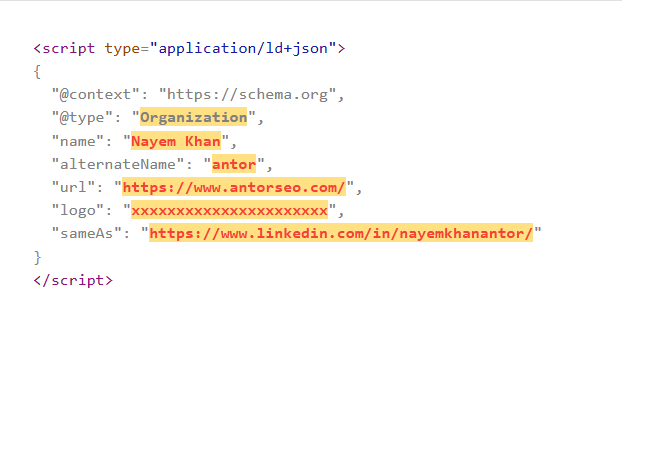
Organization Schema Example
This one goes on your homepage or about page. It tells search engines who you are as a business, and it pairs well with a local SEO strategy if you serve a specific area.
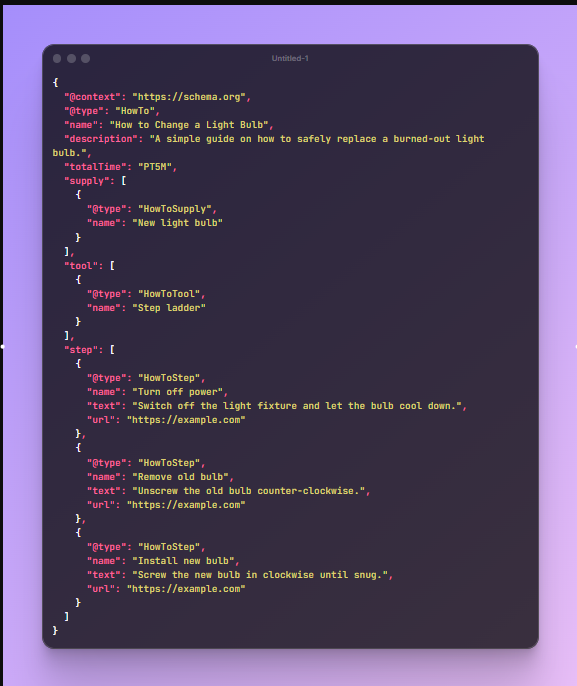
How-To Schema Example
Perfect for step-by-step tutorials. It can display steps directly in the search result.
Step-by-Step Guide: How to Add Schema Markup
You don’t need to be a developer to do this. Here are three ways to add schema markup, ranked from easiest to most advanced.
Method 1: WordPress Plugins (Easiest)
If your site runs on WordPress, this is the fastest route. Plugins like Rank Math and Yoast SEO generate schema automatically for most content types.
- Rank Math: Go to your post editor, scroll to the Rank Math meta box, click “Schema,” and choose a type like Article, FAQ, or Product. Fill in the fields and it generates the JSON-LD for you.
- Yoast SEO: Use the Schema tab in the Yoast sidebar to set the page type, and use the FAQ or How-To blocks in the editor to auto-generate matching schema.
This method takes minutes and needs zero code.
Method 2: Manual JSON-LD Code
Want full control? Add the JSON-LD script directly to your page’s HTML, ideally right before the closing tag.
Wrap your schema code like this:
This works on any platform, not just WordPress. You can paste it into your theme’s header file, a custom HTML block, or your site builder’s code injection field.
Method 3: Google Tag Manager
If you already use GTM, you can deploy schema without touching your site’s code at all.
- Create a new tag in GTM and set the type to “Custom HTML.”
- Paste your JSON-LD script (including the
<script>tags) into the HTML field. - Set the trigger to the specific page or page type you want it on.
- Publish the container and verify it’s firing correctly.
This method is great for marketers who don’t have direct access to a developer or the site’s code.
How to Test and Validate Your Structured Data
Never publish schema without testing it first. One typo can break the whole thing.
- Google Rich Results Test: Paste your URL or code to see exactly which rich results your schema is eligible for, plus any errors or warnings.
- Schema.org Validator: This checks your code against the full Schema.org vocabulary, useful for types the Rich Results Test doesn’t cover.
- Google Search Console: Check the “Enhancements” reports here regularly to catch schema errors that show up after your page is live.
Run this check every time you add new schema or make major content updates. It takes two minutes and can save you from an invisible ranking penalty.
Common Schema Markup Mistakes to Avoid
I’ve audited dozens of sites at antorseo.com with broken or misused schema. Here are the mistakes I see most often.
- Marking up content that isn’t visible on the page. Google’s guidelines require your structured data to reflect what a visitor actually sees.
- Using the wrong schema type. Don’t use Product schema on a blog post or Article schema on a service page.
- Leaving old schema after a redesign. Outdated JSON-LD that doesn’t match your current content confuses search engines and can trigger manual actions.
- Stacking duplicate schema. Having two plugins both generate Article schema on the same page creates conflicting signals.
- Skipping validation. A single missing comma can invalidate your entire JSON-LD block.
- Faking review or rating data. Only mark up reviews you’ve actually collected. Fabricated ratings violate Google’s guidelines and can get your rich results removed.
The bottom line is this: schema markup should describe reality, not decorate it.
Frequently Asked Questions
-
Is schema markup a ranking factor?
Not directly. Google has confirmed schema markup itself isn’t a ranking signal. But it drives higher click-through rates and helps AI search tools understand and cite your content, both of which support your SEO results indirectly.
-
Do I need coding skills to add schema markup?
No. Plugins like Rank Math and Yoast SEO let you add most common schema types through a simple form, no code required. Manual JSON-LD is only needed for advanced or custom setups.
-
What’s the difference between schema markup and structured data?
Structured data is the general concept of organizing information so machines can read it. Schema markup refers specifically to using the Schema.org vocabulary to create that structured data.
-
Which schema type should I start with?
Start with Organization schema on your homepage and Article schema on your blog posts. If you answer common questions anywhere on your site, add FAQ schema next since it’s one of the easiest wins for extra search visibility.
-
Does schema markup help with AI search visibility?
Yes. AI search tools rely on clearly labeled, structured content to extract facts confidently. Well-implemented schema markup makes your content easier for these tools to read, trust, and cite in their answers.
Final Thoughts
Schema markup isn’t optional anymore. It’s the bridge between what your content says and what search engines, and now AI models, actually understand.
You don’t need to overhaul your whole site today. Start with one page. Add Article or FAQ schema. Test it. Watch what happens to your click-through rate over the next few weeks. Then fold it into your broader SEO content strategy so every new page ships with the right schema from day one.
So, here’s my question for you: which page on your site is missing schema markup right now?
Drop it in the comments, and I’ll tell you exactly what schema type I’d add first.